
CONTROL UNIT / Student Formula
Integrated Electronic Throttle, BSPD & Actuator Control Unit

Student Formula
About this product
The control unit and software for driving the electronic throttle body. Inquiries about the unit on its own are also welcome.
| Includes | Control unit hardware and software |
|---|---|
| Application | Formula Student vehicles |
| Compatibility | Can be used with an existing throttle body |
| Lead time | Made to order; please contact us |
Sales launch planned — pricing to be announced
This electronic throttle control unit brings together the responsiveness and fail-safe functions needed for Formula Student. Dedicated configuration software provides visualization and adjustment of throttle response for your vehicle.
Overview
Product overview
- A dedicated control unit for driving the electronic throttle body.
- PID control makes actual throttle position (TPS) follow the requested opening, balancing responsiveness and stability.
- The accompanying THROTTLE CONTROL SUITE PC software supports PID gain adjustment, log inspection and simulation.
- Integrated quickshift functionality lets you manage throttle and shift control in one unit.
- Connect with a single USB cable. Use the READ and WRITE buttons to read and save configuration values.
Features
Features
Responsive PID control
Adjust Kp, Ki and Kd individually to tune the response for your vehicle and driver preferences.
Simulation
Simulate how the throttle follows the requested position before writing settings to the hardware.
Integrated quickshift
Manage quickshift settings in the same unit as throttle control, simplifying the wiring.
Configuration Software
THROTTLE CONTROL SUITE configuration software
Dedicated PC software for configuring the control unit: adjust PID gains, test step responses and read or write settings. The software is currently in development and is planned to be supplied with the product.
- View target position, actual throttle position (TPS), error and PWM duty in real time
- Adjust proportional (Kp), integral (Ki) and derivative (Kd) gains using sliders
- Run simulations using target-position test inputs and a specified step size
- Manage quickshift settings in the same software
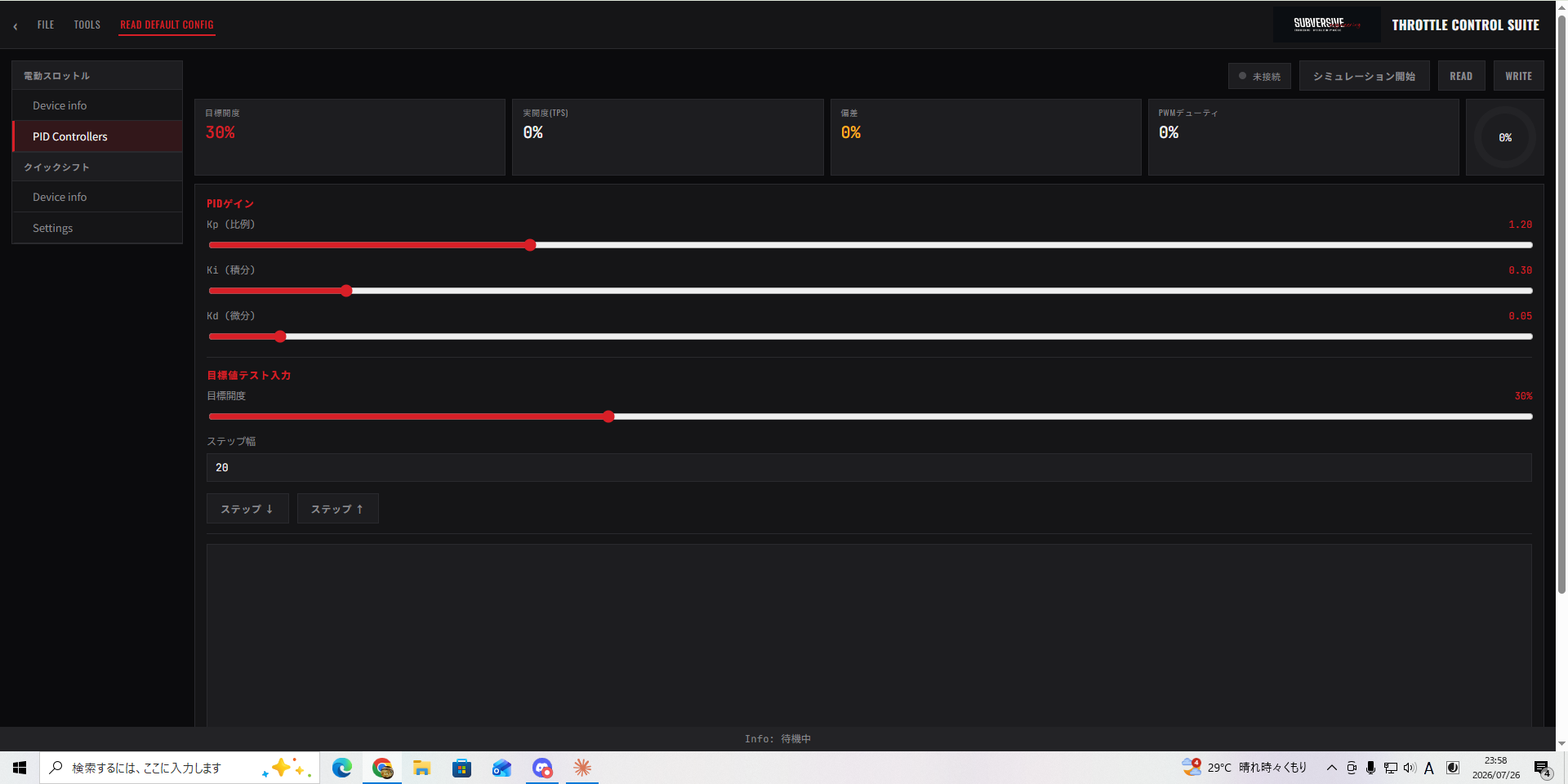
Tutorial
Configuration tutorial
The basic configuration workflow using THROTTLE CONTROL SUITE.
Connect by USB & READ
Connect the control unit to your PC with a USB cable, then select READ to load the current settings.
Adjust PID gains
Use the Kp (proportional), Ki (integral) and Kd (derivative) sliders to adjust the response.
Test the target position
Set the target opening and step size. Use the step-up and step-down controls to inspect the simulated response.
Save with WRITE
When you are satisfied with the settings, select WRITE to save them to the control unit.
Ask us about this product
We can provide details for your vehicle and application.